economy and refugees by hiring Ukrainian Software Developers - we donate a lot to charities and volunteer foundations

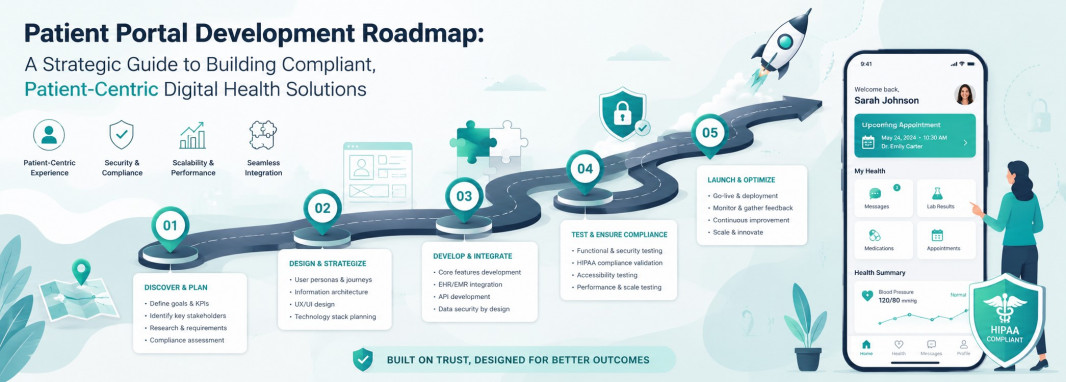
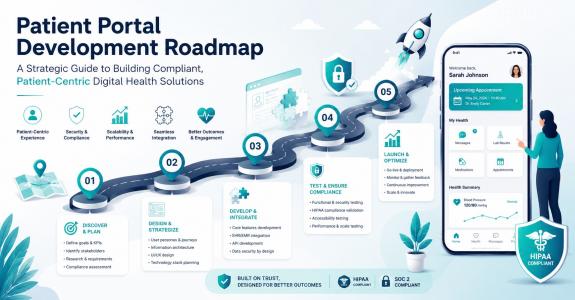
The healthcare industry has crossed the digital rubicon. Today, providing high-quality care is no longer just about clinical outcomes within the four walls of a clinic or hospital; it is about extending that care into the digital pockets of patients. A robust patient portal is no longer a luxury or a competitive advantage—it is the baseline expectation for modern healthcare delivery.
However, building a successful patient portal is a complex undertaking. It sits at the intersection of stringent healthcare regulations, intricate system integrations, high-security demands, and the need for an frictionless user experience (UX). A poorly planned development process can lead to budget overruns, non-compliant software, low patient adoption, and frustrated clinical staff.
This guide serves as a comprehensive, solution-focused roadmap for healthcare executives, product owners, and IT leaders ready to build a next-generation patient portal. We will explore everything from initial planning and core feature sets to integrations, compliance, and final implementation.
1. The Strategic Discovery and Planning Phase
Every successful software product begins long before the first line of code is written. In healthcare technology, the discovery and planning phase is where you mitigate risk, align stakeholders, and define the scope of your Minimum Viable Product (MVP).
Defining the Value Proposition
Before diving into technical specifications, you must define the "why." A patient portal should solve specific pain points for two distinct user groups: patients and healthcare providers.
- For Patients: The portal must offer convenience, transparency, and control. It should reduce the friction of booking appointments, paying bills, and accessing medical records.
- For Providers: The portal must reduce administrative burdens, decrease no-show rates, streamline communication, and improve clinical workflows.
Stakeholder Alignment and Research
A common pitfall is developing a portal based solely on executive assumptions. To avoid this, engage in thorough research:
- Clinical Staff Interviews: Speak with doctors, nurses, and administrative staff. Understand their daily workflows and where patient interactions cause bottlenecks.
- Patient Surveys and Personas: Analyze your patient demographic. A pediatric clinic needs a portal focused heavily on proxy access for parents, while a geriatric clinic requires larger fonts, simpler navigation, and high accessibility standards.
- Competitor and Market Analysis: Evaluate existing market solutions to identify feature gaps and opportunities for differentiation.
Scoping the MVP vs. Future Phases
It is tempting to build everything at once, but a phased approach ensures faster time-to-market and better adaptability based on real-world user feedback. Define what features are critical for Launch Day (e.g., secure messaging, scheduling, lab results) and what can wait for Version 2.0 (e.g., AI-driven symptom checkers or remote patient monitoring device integrations).
2. Defining the Core Feature Architecture
A modern patient portal must balance essential medical management features with consumer-grade convenience. The features should be categorized by their primary function within the patient journey.
Patient Engagement and Administration
- Self-Service Scheduling: Patients should be able to view real-time availability, book appointments, reschedule, or cancel without calling the clinic. Automated reminders via SMS or email help drastically reduce no-show rates.
- Digital Intake and Check-In: Eliminate the clipboard. Allow patients to fill out medical histories, consent forms, and insurance details from home before their appointment.
- Billing and Secure Payments: Integrate a payment gateway that supports credit cards, HSA/FSA cards, and payment plans. Clear, itemized digital invoices reduce billing confusion and accelerate collection times.
Clinical Management and Health Literacy
- Access to Electronic Health Records (EHR): Patients need a clean, readable view of their lab results, immunization histories, current medications, and allergies.
- Prescription Refill Requests: A streamlined process where patients can request refills with a few clicks, which automatically routes to the provider for approval and then to the designated pharmacy.
- Educational Content Library: Empower patients to manage their health by providing personalized, targeted articles or videos based on their diagnoses or treatments.
Communication and Continuity of Care
- Secure Asynchronous Messaging: A HIPAA-compliant messaging system allows patients to ask non-urgent clinical questions directly to their care team, reducing incoming phone call volumes.
- Telehealth Integration: Embedded virtual visits allow patients to jump from an appointment reminder directly into a secure video consultation without leaving the portal ecosystem.
3. The Technical Integration Blueprint
A patient portal does not exist in a vacuum. Its value is entirely dependent on how well it communicates with your existing healthcare IT ecosystem. Seamless data liquidity is the backbone of an effective portal.
EHR/EMR Integration
The Electronic Health Record (EHR) system is the single source of truth for clinical data. Your portal must synchronize with the EHR to display accurate patient data and push portal-generated data back into the clinical record.
- Bi-directional Syncing: While read-only access is simpler, bi-directional syncing is necessary for features like direct scheduling, intake form submission, and messaging.
- API Utilization: Modern architectures leverage robust APIs provided by leading EHR vendors (such as Epic, Cerner, Allscripts, or Athenahealth) to ensure stable data pipelines.
Interoperability Standards
To ensure longevity and scalability, your portal architecture must adhere to modern healthcare interoperability frameworks.
- HL7 (Health Level Seven): The traditional standard for transferring clinical and administrative data between software applications.
- FHIR (Fast Healthcare Interoperability Resources): The modern, JSON-based RESTful API standard. FHIR allows for granular data access, making it significantly easier to build responsive, mobile-friendly portal interfaces that load data quickly and securely.
Third-Party Systems
Beyond the EHR, a comprehensive portal integrates with several ancillary systems:
- Practice Management Software (PMS): For administrative workflows, billing, and scheduling coordination.
- Payment Gateways: Secure processors like Stripe or PayPal, optimized for healthcare compliance.
- Pharmacy Networks: Integrations with systems like Surescripts to facilitate digital prescription routing.
4. Compliance, Security, and Data Governance
In healthcare software development, security is not a feature; it is the foundation. Patient portals deal with Protected Health Information (PHI), making them high-value targets for cyber threats and subject to strict regulatory oversight.
Regulatory Compliance Frameworks
- HIPAA (Health Insurance Portability and Accountability Act): For US-based solutions, HIPAA compliance is non-negotiable. This requires strict administrative, physical, and technical safeguards to secure PHI.
- GDPR (General Data Protection Regulation): If your portal serves users in the European Union, you must incorporate principles of data minimization, the "right to be forgotten," and explicit consent mechanisms.
- HITECH Act and Meaningful Use / Promoting Interoperability: Ensure the portal meets federal criteria for patient access to health data, which often ties directly to reimbursement models.
- ADA Compliance (WCAG 2.1): Healthcare is universal. Your digital portal must be accessible to individuals with disabilities, requiring compliance with Web Content Accessibility Guidelines (e.g., screen reader compatibility, high contrast modes).
Advanced Security Safeguards
To safeguard sensitive medical information, implement a multi-layered security architecture:
- Data Encryption: All data must be encrypted both in transit (using TLS 1.3) and at rest (using AES-256 encryption standards).
- Identity and Access Management (IAM): Implement Multi-Factor Authentication (MFA) as a mandatory requirement for patient and provider logins. Use Role-Based Access Control (RBAC) to ensure users only see data they are explicitly authorized to view.
- Audit Logging: Every single action within the portal—every login attempt, record view, message sent, or profile edit—must be immutably logged. This provides an audit trail necessary for forensic analysis and compliance checks.
- Session Management: Implement strict session timeouts to protect user data if a device is left unattended in a public area.
5. Designing for the Healthcare User Experience (UX/UI)
The technical perfection of a patient portal matters very little if patients find it confusing or frustrating to use. High abandonment rates often stem from complex interfaces that resemble legacy clinical software rather than modern, intuitive consumer applications.
The Patient-First Design Philosophy
- Simplicity and Clarity: Medical terminology can be overwhelming. Avoid clinical jargon in the user interface. For example, instead of "Access Laboratory Diagnostics," use "View Lab Results."
- Mobile-First Approach: A significant portion of patients will access their portal via smartphones or tablets. Whether you build a native mobile app or a responsive web application, the interface must adapt flawlessly to smaller screens, with touch-friendly buttons and readable text.
- Empathetic Design: Keep in mind that users may be logging into the portal while stressed, anxious, or unwell. The design should feel calm, reassuring, and exceptionally easy to navigate to reduce cognitive load.
Accessibility and Inclusivity
- Multi-Language Support: In diverse communities, offering the portal interface in multiple languages is vital for driving engagement and ensuring equitable access to care.
- Elderly-Friendly UX: Optimize the interface for older demographics by allowing adjustable text sizes, avoiding low-contrast color schemes, and ensuring that navigation patterns are linear and predictable.
6. The Step-by-Step Implementation and Deployment Strategy
Transitioning from a finalized design to a fully operational, live product requires a structured, collaborative execution model.
Phase 1: Team Assembly and Partnership Selection
Building a custom patient portal requires an interdisciplinary team of specialists, including solution architects, frontend and backend developers, UI/UX designers, QA engineers, and a dedicated compliance officer.
Navigating this complex ecosystem requires deep domain knowledge. Working with an experienced technology partner can save months of trial and error. For instance, companies like Zfort group bring specialized expertise in healthcare software engineering, helping organizations build robust, compliant, and highly integrated digital solutions tailored to specific workflows. Choosing a partner that understands the nuances of healthcare interoperability ensures that your technical foundation is both secure and scalable.
Phase 2: Agile Engineering and Development
Adopt an Agile development methodology, breaking the project down into 2-week to 4-week sprints. This allows for continuous development, testing, and stakeholder review.
- Backend Architecture: Focus on setting up the database schemas, API gateways, and integration endpoints with the EHR.
- Frontend Development: Concurrently build out the user interface components based on verified UX prototypes.
- Continuous Integration/Continuous Deployment (CI/CD): Set up automated pipelines to safely deploy code updates to testing environments without breaking existing functionalities.
Phase 3: Comprehensive Rigorous Testing (QA)
Given the sensitive nature of healthcare data, testing must be exhaustive:
- Functional Testing: Verifying that every button, form, scheduling logic, and workflow operates exactly as intended.
- Integration Testing: Confirming that data flows accurately and instantaneously between the portal and the EHR without data corruption.
- Security and Vulnerability Testing: Conducting penetration testing and vulnerability scans to identify and patch potential exploits before launch.
- User Acceptance Testing (UAT): Involving actual patients and clinical staff to use the system in a staging environment to catch usability flaws.
Phase 4: Phased Deployment and Launch Strategy
Do not open the floodgates to your entire patient base overnight. A staged rollout mitigates operational risks:
- Alpha/Internal Launch: Deploy the portal exclusively to internal employees and a small group of trusted stakeholders to catch initial bugs.
- Beta/Pilot Launch: Roll out the portal to a single department, clinic location, or a small subset of patients (e.g., 5% of the database). Monitor system performance, server loads, and support tickets closely.
- Full Commercial Launch: Open registration to all patients, accompanied by marketing and educational campaigns.
7. Post-Launch Evolution, Adoption, and Maintenance
The deployment of your patient portal is not the finish line; it is the beginning of its operational lifecycle. Continuous monitoring and optimization are required to protect your investment and maximize patient adoption.
Driving Patient Adoption
A portal is only valuable if patients actually use it. To drive high adoption rates, implement a strategic onboarding plan:
- Point-of-Care Onboarding: Train front-desk staff and medical assistants to introduce the portal to patients during check-in or check-out, helping them create an account on the spot.
- Omnichannel Promotion: Utilize email newsletters, physical posters in waiting rooms, and mention the portal on your clinic's automated phone hold messages.
- Exclusive Functionality: Encourage utilization by making certain conveniences, such as direct online scheduling or fast-track digital intake, available primarily through the portal.
Ongoing Maintenance, Monitoring, and Iteration
- Performance Monitoring: Track application performance metrics, such as page load times, server uptime, and API latency, to ensure a smooth user experience.
- Feedback Loops: Embed simple, unobtrusive feedback mechanisms within the portal (e.g., "Rate your scheduling experience") to gather direct user insights.
- Continuous Compliance & Security Audits: Regulations evolve, and new cybersecurity threats emerge constantly. Schedule regular security patches, dependency updates, and annual compliance reviews to maintain your secure posture.
Conclusion: Securing Long-Term Value in Digital Health
Developing a custom patient portal is a significant strategic undertaking that requires meticulous planning, absolute dedication to regulatory compliance, and a deep understanding of the patient experience. By focusing on a phased implementation roadmap—starting with a well-defined MVP, emphasizing seamless EHR integrations, enforcing strict security standards, and designing with empathy—healthcare organizations can build a powerful digital asset.
Ultimately, a well-executed patient portal transforms the delivery of care. It shifts the patient from a passive recipient of healthcare into an active, engaged participant, while simultaneously optimization clinical workflows, reducing administrative overhead, and fostering long-term organizational growth. With the right strategy, technical architecture, and development partners, your digital health solution can set a new standard for patient-centered excellence.